> ## Documentation Index
> Fetch the complete documentation index at: https://koreai-content-gov.mintlify.site/llms.txt
> Use this file to discover all available pages before exploring further.
# Context Management
[Back to NLP Topics](/ai-for-service/automation/natural-language/nlp-topics)
Context management lets AI Agents carry information from one intent to the next, enabling natural, human-like conversations. Without it, the AI Agent would re-ask for information the user already provided.
**Example:**
> **User:** What is the cost of an Economy flight from London to Paris on Aug 15?
> **AI Agent:** It's €242.
> **User:** Great! I'd like to book it.
The AI Agent should already know the flight details from the previous intent — no need to ask again.
***
## Use Cases
| Scenario | Description |
| ------------------------------------------- | -------------------------------------------------------------------------------------------------------------------------------------------------------------------------------------------------------------------- |
| **Sharing context across intents and FAQs** | Context is maintained across dialog tasks and FAQs, enabling a consistent experience. |
| **Context-driven FAQs** | A FAQ is available only when a specific intent is already in context. For example, *What meal options are available?* shows only when *Book a Flight* is active. |
| **Follow-up intent detection** | The current context helps identify the next intent. For example, *What are the extra charges?* resolves to *What are the charges for a Premium Economy seat?* if the user just asked about Premium Economy benefits. |
| **Sharing entity values** | Entity values from one intent pre-populate entities in another. For example, *Destination City* from *Check Flight Status* pre-fills *City Name* in *Check Weather*. |
## Implementation
Context management involves four steps:
1. **Output Context** — Define tags that mark the current intent as executed.
2. **Intent Preconditions** — Use output context tags to scope which intents are detected next.
3. **Contextual Intent Detection** — Use context tags to identify relevant intents and FAQ paths.
4. **Conversation Flows** — Customize flows using context tags to pre-populate entities or define transitions.
***
### Output Context
**Context Tags** are generated and stored in the context object. The Platform creates a context object for every user intent (dialog tasks and FAQs). [Learn more](/ai-for-service/automation/agent-flows#context-object)
**Default context tags** — Intent names, entity names, and FAQ term/node names are emitted automatically.
**Custom context tags** — You can define additional tags for the following:
#### Dialog Tasks
* The intent name is emitted as a context tag when execution starts.
* Add extra tags from the **NLP Properties** tab of the dialog task.
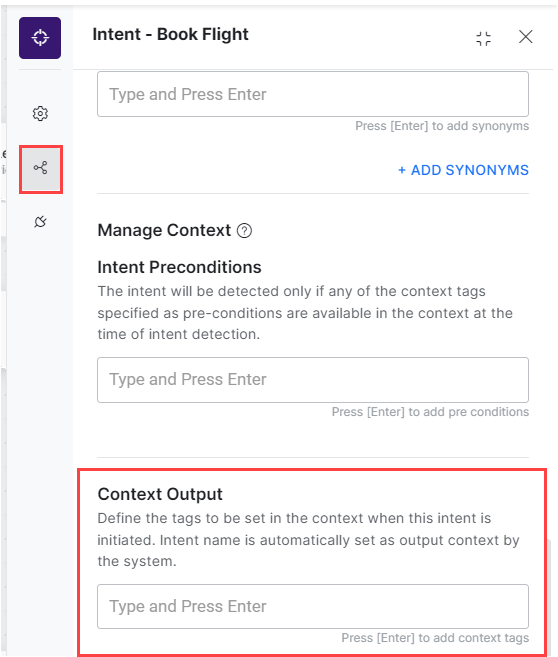 * Emit tags from any JavaScript location (script node, advanced prompts, run-a-script) using `contextTags.add("value")`.
#### Alert Tasks
* The task name is emitted as a context tag when execution starts.
* Add extra tags under **More Options** or **General Settings**.
* Emit tags from any JavaScript location (script node, advanced prompts, run-a-script) using `contextTags.add("value")`.
#### Alert Tasks
* The task name is emitted as a context tag when execution starts.
* Add extra tags under **More Options** or **General Settings**.
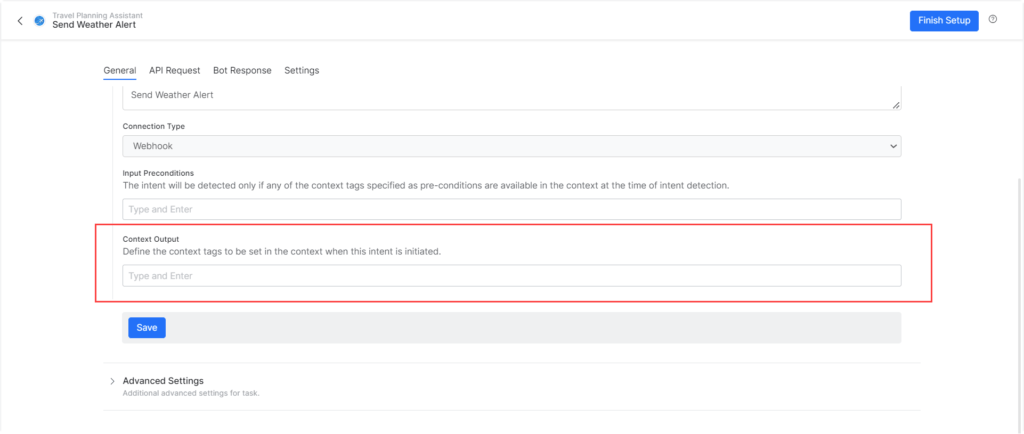 * Emit tags from pre-processors or post-processors using `contextTags.add("value")`.
#### Entities
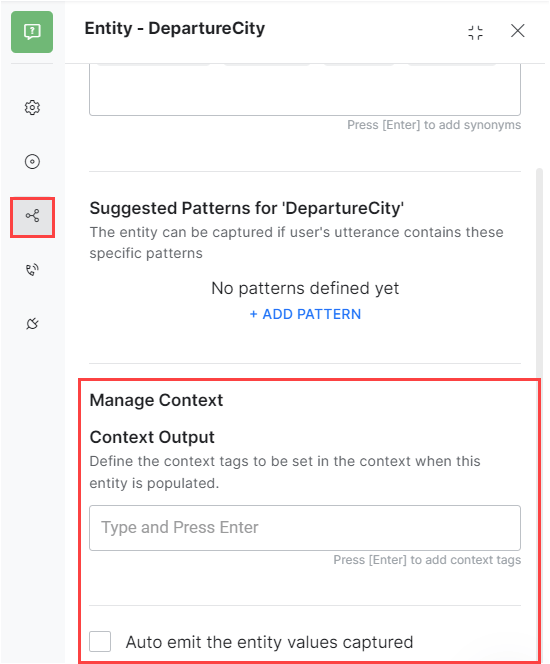
* Entity values are emitted based on the **Auto emit the entity values captured** toggle.
* Add extra tags per entity node.
* Emit tags from pre-processors or post-processors using `contextTags.add("value")`.
#### Entities
* Entity values are emitted based on the **Auto emit the entity values captured** toggle.
* Add extra tags per entity node.
 #### Knowledge Graph
* Node and term names are emitted as context tags for all mandatory and optional terms in a qualified path.
* Add extra tags per term from the term's **Settings** page.
#### Knowledge Graph
* Node and term names are emitted as context tags for all mandatory and optional terms in a qualified path.
* Add extra tags per term from the term's **Settings** page.
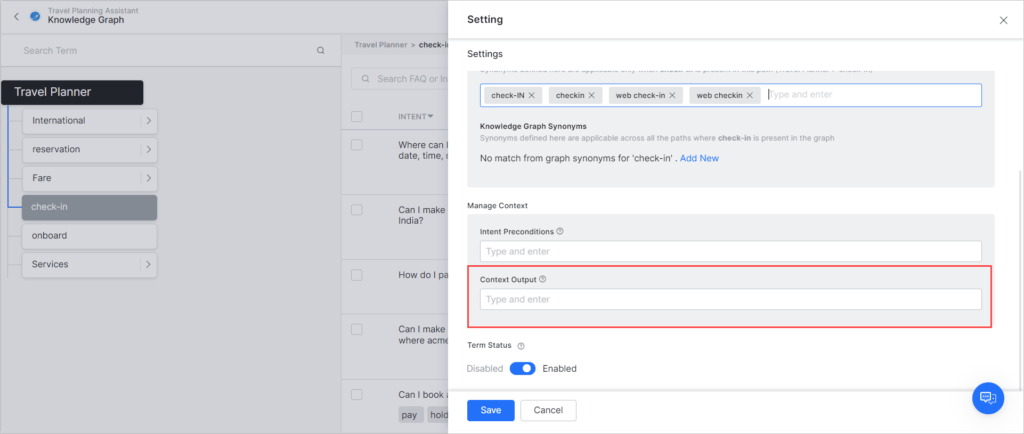 * Emit tags from advanced prompts using `contextTags.add("value")`.
***
### Intent Preconditions
Intent preconditions define when an intent or FAQ becomes available for detection — only when specific context tags are present.
#### Dialog Tasks
* Add one or more preconditions to make a dialog intent available only in the right context.
* Emit tags from advanced prompts using `contextTags.add("value")`.
***
### Intent Preconditions
Intent preconditions define when an intent or FAQ becomes available for detection — only when specific context tags are present.
#### Dialog Tasks
* Add one or more preconditions to make a dialog intent available only in the right context.
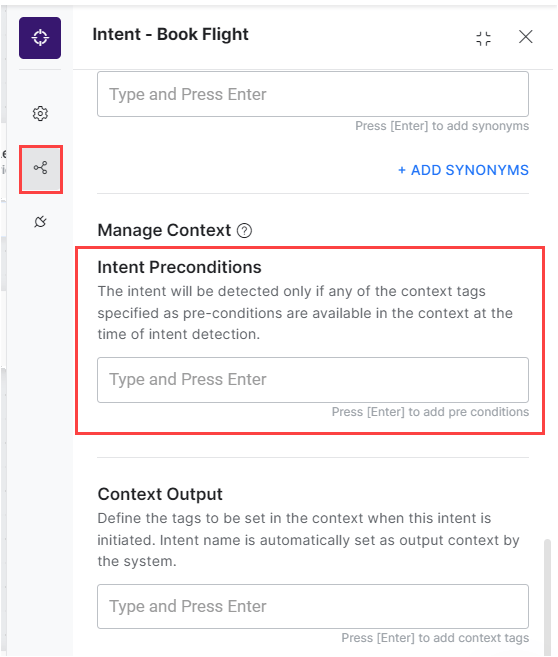 * Intents with preconditions are treated as sub-intents and follow [Linked Task Exception](/ai-for-service/automation/intelligence/sub-intents-and-follow-up-intents#linked-task-exceptions) behavior.
#### Alert Tasks
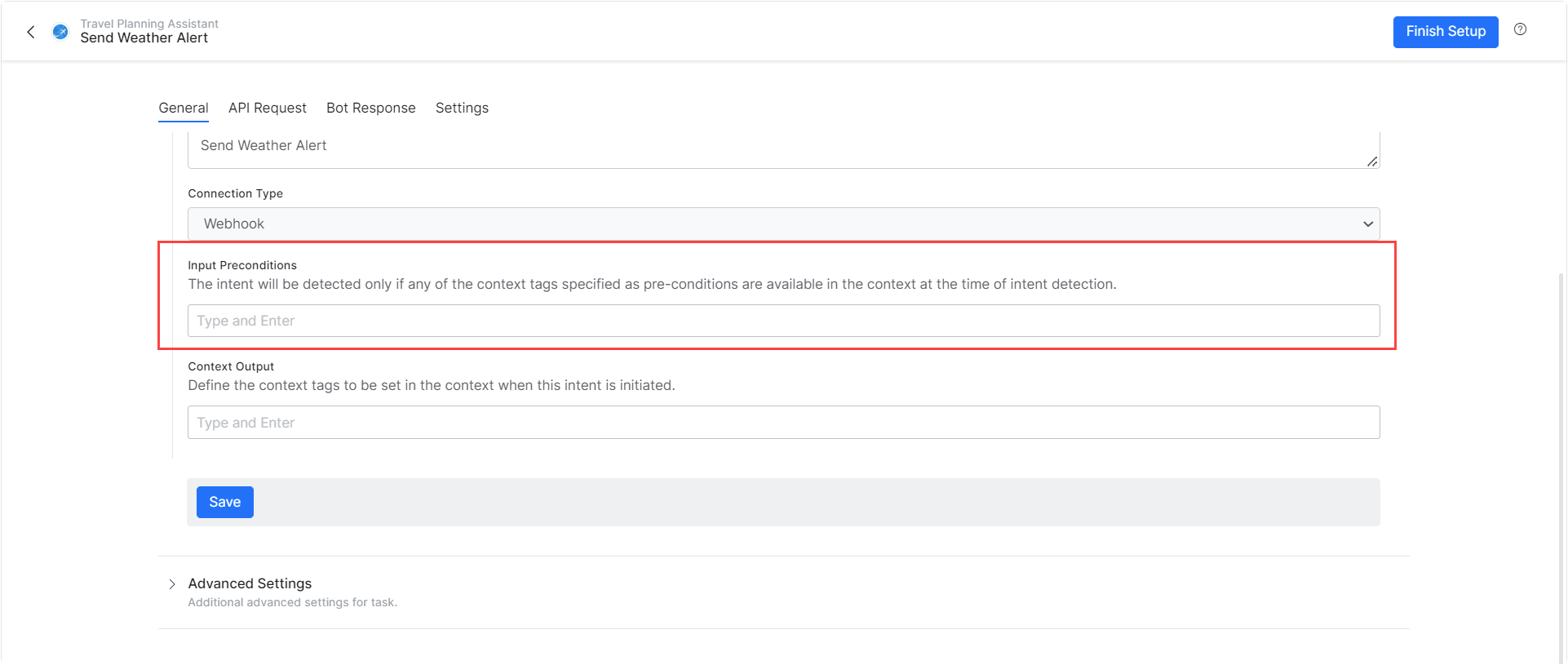
* Add one or more preconditions to make a task available only in the right context.
* Intents with preconditions are treated as sub-intents and follow [Linked Task Exception](/ai-for-service/automation/intelligence/sub-intents-and-follow-up-intents#linked-task-exceptions) behavior.
#### Alert Tasks
* Add one or more preconditions to make a task available only in the right context.
 #### Knowledge Graph
* Define preconditions per term in the Knowledge Graph.
#### Knowledge Graph
* Define preconditions per term in the Knowledge Graph.
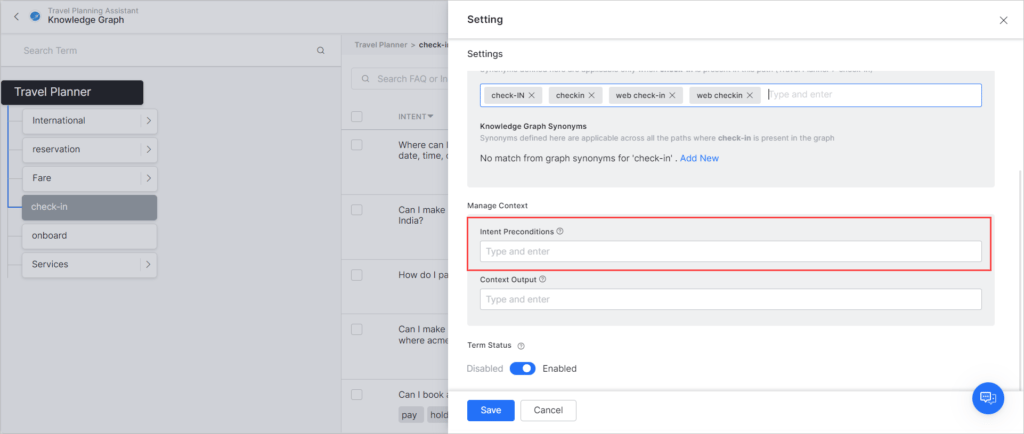 * A path is qualified only if its term preconditions are met.
***
### Contextual Intent Detection
#### Tasks
Define rules for contextually relevant intent detection using output context tags (similar to traits). [Learn more](/ai-for-service/automation/natural-language/training/traits)
#### Knowledge Graph
Enable context tags to qualify paths in the Knowledge Graph:
1. Go to **Build > Natural Language > NLU Config > Knowledge Graph**.
2. Set **Qualify Contextual Paths** to **Yes**.
* A path is qualified only if its term preconditions are met.
***
### Contextual Intent Detection
#### Tasks
Define rules for contextually relevant intent detection using output context tags (similar to traits). [Learn more](/ai-for-service/automation/natural-language/training/traits)
#### Knowledge Graph
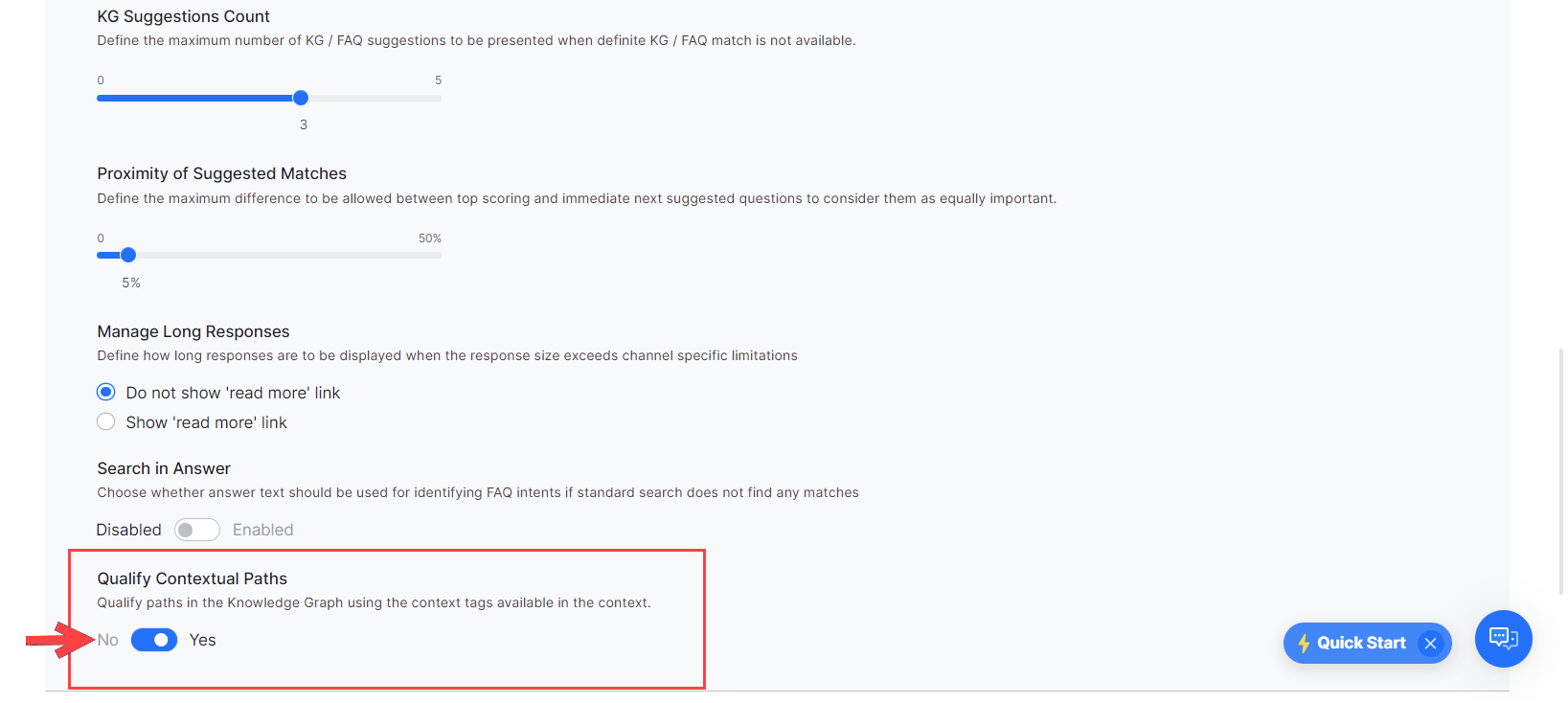
Enable context tags to qualify paths in the Knowledge Graph:
1. Go to **Build > Natural Language > NLU Config > Knowledge Graph**.
2. Set **Qualify Contextual Paths** to **Yes**.
 ***
### Conversation Flows
Use context tags to customize dialog flows:
* Pre-populate entity values.
* Define transition conditions.
* Build custom conversation flows.
**Script references:**
| Context | Script |
| --------------------- | ------------------------------ |
| Current context tags | `context.currentTags.tags` |
| Previous context tags | `context.historicTags[0].tags` |
***
***
### Conversation Flows
Use context tags to customize dialog flows:
* Pre-populate entity values.
* Define transition conditions.
* Build custom conversation flows.
**Script references:**
| Context | Script |
| --------------------- | ------------------------------ |
| Current context tags | `context.currentTags.tags` |
| Previous context tags | `context.historicTags[0].tags` |
***